
Vidicom Review: A fast AI video creator for scroll-stopping, branded marketing clips.
If you struggle to make short videos that actually get views, you are not alone. Editing eats time. Finding stock clips is a pain. And keeping a steady posting schedule across TikTok, Reels, and Shorts can drain your focus. In this Vidicom Review, I break down a tool that promises to fix those problems with smart templates, AI help, and one-click exports. I tested it to see if it is as simple as it claims, and whether it can help you create more videos in less time without hiring a team.

What is Vidicom?
Vidicom is a video creation and video marketing platform that helps you turn ideas, scripts, or URLs into ready-to-publish videos. It claims to speed up editing with AI, templates, auto-captions, and voiceovers. You can make vertical, square, or horizontal videos for TikTok, Instagram, YouTube, and ads. In short, Vidicom aims to cut the learning curve and help you ship more content that looks pro.
My Personal Experience & In-Depth Walkthrough:
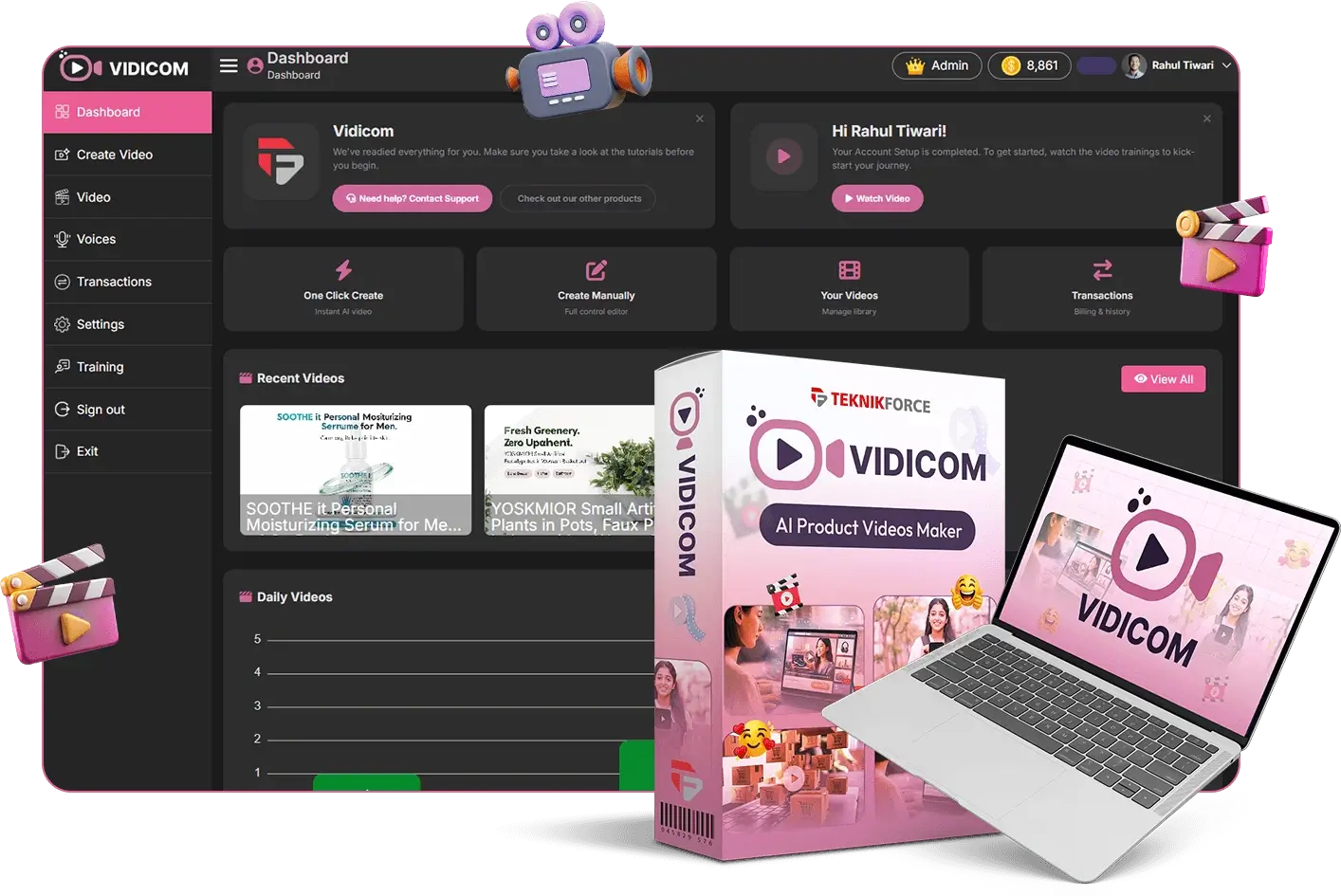
For this Vidicom Review, I used Vidicom for 48 hours across a few real use cases. I made two YouTube Shorts, one Instagram Reel, and a product teaser. I wanted to see how fast I could go from idea to post. I also wanted to test brand control, AI, and export quality.
I started on the dashboard and picked a vertical template. The templates are clean and modern. This is a big win for speed. I dropped in a short script. The AI created scenes with matching stock clips and caption layers. It was fast, which is a major pro. But my first rough cut felt a bit generic. I swapped a few clips and tweaked the color to match my brand. That took minutes, not hours.
Next, I tried the text-to-speech voices. Some voices sounded natural and had good pacing. Others felt a bit robotic. That is a con to note. I switched to a warmer voice, adjusted speed, and it sounded much better. I also recorded a quick voiceover in the app, which worked fine and synced well.
The auto-captions were a highlight. They were accurate in my tests, and the style presets looked on-brand fast. I adjusted word emphasis with simple clicks. The timeline editor is simple but not basic. I trimmed clips, set keyframes for scale, and added a light zoom-in for energy. I liked that I could drag and drop transitions and use L-cuts without lag.
For my last project in this Vidicom Review, I pasted a blog URL. The AI pulled key points and laid out a video outline. It saved me time, yet I still had to refine the script to add voice and hooks. That is normal with AI. The media library has a good range of stock videos, images, and music. Search was quick. I wish there were more niche B-roll for some topics, but most common needs were covered.
Publishing was smooth. I exported a 1080×1920 Short, then resized the same project to 1920×1080 for YouTube. The resize held the captions and framing well, which is a big pro. Rendering was quick on my laptop. My final videos looked sharp, and the captions were crisp. If you want a quick summary of this Vidicom Review: the tool is fast, friendly, and strong for short-form. The AI is helpful but still works best when you guide it.

What Makes It Stand Out / Key Features
- AI-assisted script-to-video creation with scene suggestions and matching stock media
- Clean, swipe-stopping templates for Shorts, Reels, Stories, and ads
- Auto-captions with style presets, brand fonts, and color control
- Text-to-speech voices plus built-in voiceover recording and timing
- Simple timeline editor with trims, transitions, keyframes, and overlays
- One-click resize for vertical, square, and horizontal formats
- Stock video, image, and music library with fast search
- Brand kit for logos, palettes, fonts, and reusable styles
- Direct social-ready export in high quality (1080p) with fast rendering
- Project duplication and versioning for quick A/B creative tests
What I Like
- Very short setup-to-first-video time, great for busy marketers
- Templates that do not look cheesy; easy to customize style
- Accurate auto-captions that boost watch time on mute
- Scene-by-scene AI assist that speeds up rough cuts
- Quick export and reliable resizing across formats
- Brand kit keeps every video on-spec without extra clicks
- Stock media search is fast and relevant for common niches
- Smooth timeline that beginners can learn in minutes
- Flexible voice options: TTS or record your own
- Strong fit for daily short-form output and content repurposing

What Can be improved
- Some AI voices still sound robotic; pick carefully or record your own
- Initial AI layouts can feel generic without light tweaks
- Niche B-roll depth varies; advanced topics may need uploads
Pricing And Affordability
In this Vidicom Review, pricing is based on the public sales page details at the time you visit. Launch offers and promos can change, so check the checkout page for the latest deal and any coupons.
| Plan | Access Type | Best For | Pricing at Launch/Promo |
|---|---|---|---|
| Front-End (Commercial) | Core app + templates + exports | Solo creators, small teams | Displayed on checkout (intro pricing may be one-time) |
| Pro/Unlimited Upgrade | More templates, assets, longer exports | Daily posters, agencies | Displayed on checkout (may be recurring or one-time during launch) |
| Template Club / DFY | Extra templates and monthly drops | Speed-focused editors | Displayed on checkout |
| Agency/Team | Multi-seat, brand kits, client delivery | Agencies and teams | Displayed on checkout |
| Reseller | License to resell with accounts | Consultants, resellers | Displayed on checkout |
Tip: If you see a one-time lifetime option, it tends to be for the launch window only. After that, it may switch to recurring. Always confirm limits like monthly credits, export caps, and resolution on the checkout page.

Why should you buy Vidicom
If you want to publish more short videos without a steep learning curve, Vidicom hits a sweet spot. In my Vidicom Review tests, I made clean, branded videos fast. The AI saved time on rough cuts. The auto-captions and templates lifted quality with little effort. I like that I can resize for every channel in one click and keep my brand kit locked in. While some AI voices are mixed, the voiceover recorder fixes that. For creators, coaches, local businesses, and ad buyers, Vidicom helps you post more often with less stress. If you want a tool that gets out of the way and lets you ship, Vidicom is worth it.
Comparison With Competitors of Vidicom
| Feature | Vidicom | InVideo | Pictory | VEED | Canva Video |
|---|---|---|---|---|---|
| Best For | Fast shorts, branded captions | Templates, marketing promos | Script-to-video, blog-to-video | Editing, subtitles, teams | Simple social videos, design-first |
| AI Script-to-Scene | Yes, with stock match | Yes | Strong | Limited | Limited |
| Auto-Captions | Yes, styled presets | Yes | Yes | Yes | Basic |
| Text-to-Speech | Yes | Yes | Yes | Yes | Limited |
| Brand Kit | Yes | Yes | Yes | Yes | Strong |
| One-Click Resize | Yes | Yes | Yes | Yes | Yes |
| Learning Curve | Very low | Low | Low | Low–Medium | Very low |
| Export Quality | 1080p | 1080p+ | 1080p | 1080p+ | 1080p |
| Standout | Speed + captions + resize | Broad templates | Blog/URL conversion | Detailed editor | Design library |

FAQ Of The Vidicom Review
Is Vidicom beginner-friendly?
Yes. In my Vidicom Review, I made a full Short in minutes. The templates, captions, and simple timeline make it easy for first-time editors.
Can I use Vidicom for client work?
Yes, if your plan includes a commercial license. Always check your plan on the checkout page for usage rights and any client seat limits.
Does Vidicom support vertical, square, and horizontal videos?
Yes. You can switch formats with one click. My tests kept captions and framing in place with minor tweaks.
Are there limits on exports or assets?
Plans can include usage caps. Check the pricing page for monthly limits, resolution caps, and stock usage rules before you buy.
Does Vidicom include voiceover options?
Yes. You get text-to-speech and a built-in recorder. In my Vidicom Review, I found recording your own voice gives the best sound.
Conclusion
Vidicom makes short-form and social videos fast, clean, and on-brand. In this Vidicom Review, the standouts were quick AI rough cuts, accurate auto-captions, and easy resizing. The voices are mixed, but the built-in recorder solves that. If you want to post more TikTok, Reels, Shorts, or ad creatives without a heavy edit tool, Vidicom is a smart pick. It helps you ship, test, and scale your video marketing with less effort.