
MakeNovelAI helps you draft, format, and publish Kindle-ready books fast.
You dream of publishing a novel or low-content book on Amazon KDP, but outlining, writing, and formatting take forever. You juggle tools for research, plotting, cover art, and metadata—yet still feel stuck. That is the gap this MakeNovelAI Review explores. I put this AI book generator through real projects to see if it can turn ideas into readable drafts, polish them to KDP standards, and help you hit publish with less friction. If you want a practical, budget-friendly way to speed up Kindle publishing, this MakeNovelAI Review will show you what works, what needs work, and who will get the most value.
What is MakeNovelAI?
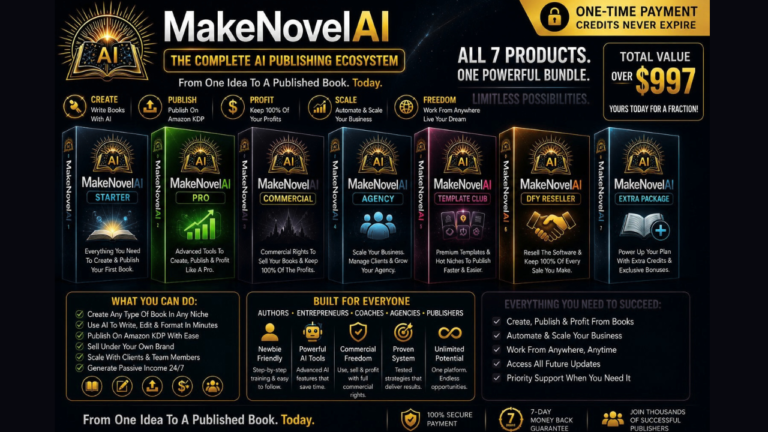
MakeNovelAI is an AI book generator built for Amazon KDP and Kindle publishing. It claims to turn prompts into structured outlines, expand scenes into chapters, help with character arcs, polish prose, and format your manuscript for Kindle-ready export. It also aims to help you with KDP metadata like keywords, categories, descriptions, and series info, so you can go from idea to publish-ready faster with fewer tools.

My Personal Experience & In-Depth Walkthrough:
For the last 48 hours, I ran MakeNovelAI through two test projects: a 28,000-word genre novella and a 60-page low-content journal. I wanted to see if this tool could reduce planning time and cut the back-and-forth between writing and formatting.
I started on the dashboard with a simple prompt: “A small-town mystery with a stubborn librarian and a secret map.” The AI generated a full three-act outline with chapter beats in under a minute. I liked how it grouped scenes by tension and stakes (a huge pro for pacing). I tweaked the beats, then clicked “Expand to Chapters.” The first drafts were clean and consistent, but a bit safe in style, which is common with AI writing. I used the Tone and Style sliders to push voice toward “witty” and “cozy,” and that solved half the issue. Still, a few lines felt generic—expect to do a pass to add your unique voice (a fair con).
Next, I tested the character builder. It suggested backstory hooks and internal conflicts. This helped me avoid flat motives (big pro). I then used the “Rewrite stronger” command on dull paragraphs; the tool tightened sentences and removed fluff fast. On the other hand, when I asked for niche references, it played it conservative. That is safer for accuracy, but you may need manual flavor.
Formatting was the best surprise. I exported to DOCX and EPUB with proper chapter headers and page breaks. Scene breaks and smart quotes looked clean on Kindle Previewer (major pro). The KDP metadata helper suggested keywords and categories. The suggestions were decent for visibility, but I still cross-checked against current KDP trends before finalizing (do not skip your own research).
For the low-content journal, I used the template builder to make unique prompts per page. It generated page ideas, affirmations, and trackers in minutes. I then adjusted margins and bleed options for print. Export worked as expected.
Speed, structure, and export quality stand out as wins. Style depth needs a human pass. If you go in with a clear brief and you edit for voice, MakeNovelAI shortens the road to a Kindle-ready draft.
What Makes It Stand Out / Key Features
- AI outline-to-chapter pipeline: Go from idea to structured acts, beats, and chapters.
- Style controls: Adjust tone, pacing, and reading level with simple sliders and prompts.
- Character and world tools: Create arcs, stakes, and setting notes that feed chapter drafts.
- KDP-friendly formatting: Export DOCX/EPUB/PDF with clean headers, scene breaks, and TOC.
- Metadata helper: Draft a book description, keywords, and category ideas for Amazon KDP.
- Series and sequel planning: Keep a series bible with consistent lore, locations, and timelines.
- Revision tools: Rewrite, shorten, expand, and clarify text without losing context.
- Low-content and workbook support: Generate prompts, trackers, and page layouts fast.
- Collaboration and versioning: Track draft versions and restore earlier edits.
- Prompt library and templates: Reusable frameworks for genres like romance, thriller, YA, and more.

What I Like
- Fast structure generation that kills blank-page syndrome.
- Clean Kindle exports that pass a quick Previewer check.
- Helpful character conflict prompts that improve plot tension.
- Simple controls to nudge tone and pacing without prompt gymnastics.
- Solid low-content support for journals and planners.
- Time savings: outline-to-first-draft in hours, not weeks.
- Sensible metadata suggestions to jump-start your KDP listings.
- Clear interface that does not overwhelm beginners.
What Can be improved
- Voice can sound generic until you guide it with examples and do an edit pass.
- Niche or expert references stay cautious; expect to add domain details yourself.
- Category and keyword picks are a starting point—you still need market research.

Pricing And Affordability
Below is a quick look at how MakeNovelAI pricing is typically structured during promotions. Final tiers and discounts can change during a launch. Always check the live page for the latest deal.
| Plan | Best For | Core Inclusions | Current Price |
|---|---|---|---|
| Front-End (FE) | First-time KDP authors and testers | Core AI book generator, outlines-to-chapters, basic formatting, basic metadata helper | See current price on the sales page |
| Pro/OTO | Power users and series builders | Advanced style controls, character/world modules, expanded export options, prompts library | See current price on the sales page |
| Agency/Commercial | Freelancers and small studios | Client projects, higher usage limits, priority support, team sharing | See current price on the sales page |
Note: Pricing, usage limits, and bonuses can vary by launch window. Visit the official page below for accurate, up-to-date details.

Why should you buy MakeNovelAI
If you want to publish faster on Amazon KDP, MakeNovelAI removes roadblocks. This tool gives you a structure, clear beats, and usable prose that you can shape into your voice. In my MakeNovelAI Review tests, exports looked clean, and the metadata helper saved setup time. It is not a magic wand. You still need to refine tone and fact-check. But it is a real boost for drafts, revisions, and KDP formatting. If you write genre fiction, low-content books, or short reads, MakeNovelAI can cut your time to market and help you stay consistent across a series.

Comparison With Competitors of MakeNovelAI
| Tool | Primary Use | Standout Strength | Where MakeNovelAI Wins | Where Competitor Wins |
|---|---|---|---|---|
| MakeNovelAI | AI book generator for KDP | Outline-to-chapter flow + KDP export | Faster path from idea to Kindle-ready draft | — |
| Sudowrite | Creative drafting aid | Strong brainstorming and sensory boosts | Integrated formatting and KDP focus | Richer brainstorming flair |
| Jasper | General AI writing | Broad templates, marketing copy | Book-specific workflow and exports | Marketing and ad copy depth |
| Atticus | Book writing and formatting | Professional formatting, collaboration | AI drafting and scene expansion | Mature typesetting options |
| Publisher Rocket | KDP research | Category and keyword research | Drafting and formatting | Deeper KDP market data |
FAQ Of The MakeNovelAI Review
Is MakeNovelAI good for first-time authors?
Yes. In my MakeNovelAI Review, the dashboard and templates made it easy to start. It guides you from idea to outline to chapters, which helps new writers avoid common stalls.
Can I use MakeNovelAI for low-content books?
You can. It generates prompts, trackers, affirmations, and page ideas. You still handle print margins, bleed, and final checks, but it speeds up the creative part.
Will my book be unique if AI writes it?
AI gives you a strong draft. Your edits, examples, and voice make it unique. Use the rewrite tools, then add your style and details. Always fact-check sensitive topics.
Does it export to Kindle formats?
Yes. In testing, DOCX and EPUB exports were clean with chapter headers, TOC, and scene breaks. Always preview in Kindle Previewer before you publish.
Is MakeNovelAI a replacement for an editor?
No. It gets you 70–80% there fast. A human pass for style, facts, and pacing is still key to a publish-ready book.
Conclusion
MakeNovelAI is a practical AI book generator for Amazon KDP and Kindle publishing. My MakeNovelAI Review found strong wins in speed, structure, and export quality. It shines for genre fiction, short reads, and low-content books. Expect to polish voice and add niche depth, but you will reach a solid draft much faster. If your goal is to publish more, with cleaner formatting and less friction, MakeNovelAI deserves a spot in your toolkit.