
AI SaaS is cloud software powered by AI that automates tasks and decisions.
If you want a clear, friendly guide that explains what is AI SaaS without fluff, you’re in the right place. I’ve shipped AI products, run vendor trials, and learned where the real value hides. In this deep dive, you’ll see what is AI SaaS, how it works, why it matters, and how to pick and roll it out with confidence.

What is AI SaaS? A clear definition and why it matters
AI SaaS means Software as a Service that uses artificial intelligence to deliver results. It runs in the cloud, scales on demand, and updates often. The AI part makes the software learn, predict, or generate content, not just store data. When people ask what is AI SaaS, they want to know how tools like chatbots, copilots, or smart automations work and why they help.
Here is how AI SaaS is different from classic SaaS:
- It adapts to your data and behavior over time.
- It can read, write, and reason with text, images, audio, or code.
- It offers API access so you can embed AI into your apps.
- It ships fast with small, safe changes and continuous testing.
Why it matters:
- You move faster. No big servers to set up.
- You pay for what you use. Costs are clear and easy to plan.
- You get access to top AI models without deep ML teams.
I am often asked what is AI SaaS by leaders who need quick wins. The goal is not to chase hype. It is to pick focused use cases that pay back fast.
How AI SaaS works: From data to value
At its core, AI SaaS turns data into outcomes through simple steps. This is the usual flow I see in the field.
Data and connectors
Your data flows in from CRMs, ERPs, ticket tools, logs, or files. Vendors use secure connectors or APIs. Some keep data in your cloud. Others store it in their managed stack.
Models and inference
Models make predictions or generate answers. These can be large language models, vision models, or custom models. Inference happens in the vendor cloud, your VPC, or a private endpoint.
Orchestration and UI
You use web apps, plugins, or APIs. Workflows route tasks, call tools, and log outputs. Many tools include prompts, templates, and policy rules.
Governance and safety
Vendors add filters, audit logs, and role controls. Good platforms offer red-teaming, rate limits, and model choice. This cuts risk and keeps you compliant.
A quick story: I set up an AI SaaS copilot for support tickets. We used a secure connector, a standard model, and a feedback loop. In week one, handle time dropped by 18% with no drop in quality.
Real-world use cases and examples
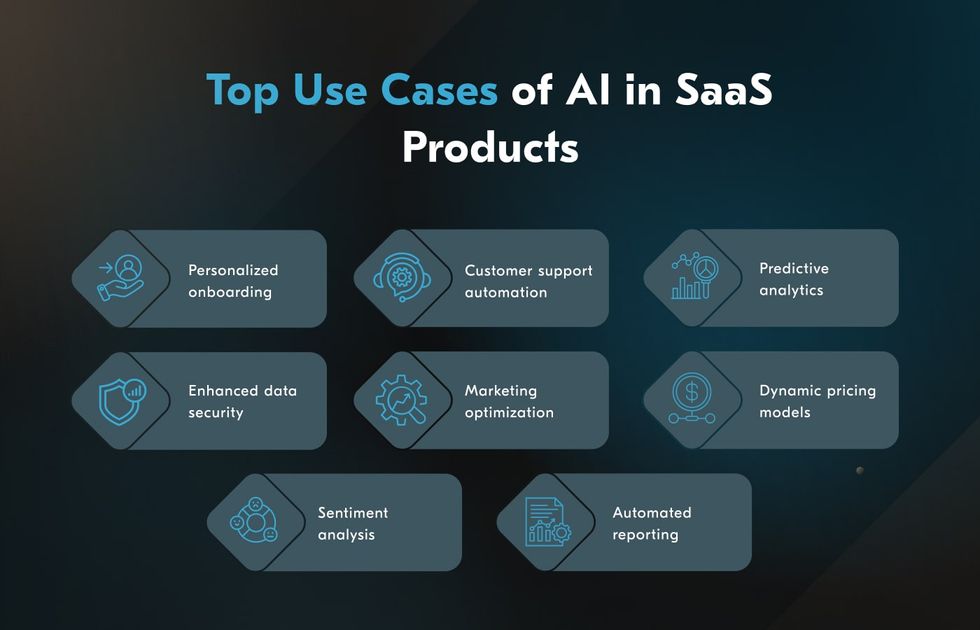
When people search what is AI SaaS, they also want to see where it works. Here are common wins I have seen.
- Marketing: Draft blogs, ads, and email copy. Rewrite for tone and brand. Tag assets.
- Sales: Write call notes, enrich leads, and suggest next steps. Score intent from emails.
- Support: Summarize tickets, propose replies, and route cases. Power smart chat.
- HR: Screen resumes with fairness checks. Draft job posts. Answer policy questions.
- Finance: Flag risky spend. Extract data from invoices. Forecast cash flow.
- Operations: Predict demand and delays. Plan routes. Schedule staff.
- Engineering: Code assistance, unit tests, and bug summaries. PR notes with context.
One client asked what is AI SaaS good for in supply chain. We used an AI SaaS forecaster plus a rules engine. Stockouts fell, and planners got clear reasons for each suggestion.
Benefits and ROI you can expect
The best answers to what is AI SaaS point to outcomes you can measure.
- Speed: Teams ship work faster with fewer handoffs.
- Cost: You save on tools, compute, and rework.
- Accuracy: AI can spot patterns and errors you miss.
- Scale: You serve more users with the same team.
- Insight: AI turns messy data into clear actions.
Quick ROI check:
- Pick a task that eats time today.
- Measure the current time per task.
- Pilot AI SaaS for two weeks.
- Compare time saved and error rate.
- Convert time saved into cost or revenue.
In one rollout, a 20-seat team saved 8 hours per person per week. That funded more work without new hires.
Risks, limits, and how to mitigate them
A balanced view of what is AI SaaS must cover risk. Here are the main ones and fixes that work.
- Hallucinations: Models can make up facts. Fix with human review and grounded data.
- Bias and fairness: Biased inputs cause biased outputs. Fix with tests and guardrails.
- Data privacy: Leaks can hurt trust. Fix with strict access and encryption.
- Vendor lock-in: Switching later can be hard. Fix with portable data and open APIs.
- Uptime and latency: AI can be slow at peak. Fix with SLAs and caching.
- Model drift: Results change over time. Fix with monitoring and re-eval plans.
Simple safety kit:
- Create eval sets and score outputs per use case.
- Use tiered approval for high-impact actions.
- Log prompts, responses, and decisions with IDs.
- Train users and set clear do and don’t rules.

Pricing models and total cost
If you ask what is AI SaaS worth, you need to grasp pricing. It varies by tool and workload.
Common models:
- Per user seat: Good for copilots and editors.
- Per token or character: Common for text generation.
- Per task or output: Good for document processing.
- Per API call: Good for builders and platforms.
- Hybrid: A base fee plus usage tiers.
Hidden costs to watch:
- Setup and integration work.
- Premium features such as private models.
- Data egress or overage fees.
- Support tiers and SSO add-ons.
- Change management and training.
Tip: Run a 30-day usage test. Compare list price, add-ons, and the value per outcome.
Buy vs build: When AI SaaS makes sense
A smart answer to what is AI SaaS includes when to buy rather than build.
Choose AI SaaS when:
- The use case is common and well known.
- You need results fast and with low risk.
- You lack a full ML or MLOps team.
- You want support, updates, and SLAs.
Consider building when:
- Your data or rules are very unique.
- You need deep control or custom IP.
- Latency, cost, or privacy needs are strict.
Rule of thumb: If a vendor solves 80% of needs and adds 80% speed, buy. Build the last mile or extend with APIs.

How to evaluate AI SaaS vendors: A practical checklist
I use a simple checklist when teams ask what is AI SaaS to choose. It keeps focus on value and safety.
Core checks:
- Accuracy: Ask for benchmarks and test on your data.
- Security: Look for encryption, SSO, RBAC, and audit logs.
- Compliance: SOC 2, ISO 27001, and data residency options.
- Privacy: Clear data retention and no training on your data by default.
- Model choice: Bring-your-own-model or private endpoints when needed.
- Transparency: Prompt controls, policy rules, and content filters.
- Integration: Native connectors and a clean, well-documented API.
- Reliability: SLAs, rate limits, and clear incident history.
- Portability: Data export, webhook support, and schema docs.
- Support: Real people, fast replies, and a roadmap you can see.
Sample RFP questions:
- What eval methods do you use, and can we see sample sets?
- How do you prevent training on our data?
- What are your limits per minute and per day?
- How do you handle PII and deletion requests?
- Can we pin a specific model version?
Implementation roadmap: 30-60-90 days
A clean plan helps you move from what is AI SaaS to real results.
Days 0–30: Prove value
- Pick one use case with clear metrics.
- Set a success target and a review date.
- Integrate one data source and ship a small pilot.
- Collect user feedback and track time saved.
Days 31–60: Expand and harden
- Add guardrails, SSO, and logging.
- Train users with short, hands-on sessions.
- Add two more data sources.
- Build a simple dashboard for KPIs.
Days 61–90: Scale and govern
- Roll out to more teams with a playbook.
- Set up model and prompt version control.
- Run a risk review and update policies.
- Plan next use cases with clear ROI.
Future trends shaping AI SaaS
When we forecast what is AI SaaS next, a few trends stand out.
- Multimodal AI: Text, images, audio, and video in one workflow.
- AI agents: Tools that act, not just chat or predict.
- Vertical focus: Deeper, domain models for fields like law or health.
- On-device and edge AI: Lower latency and better privacy.
- Open models: More choice and lower costs with strong open models.
- Safer AI: More controls, red-teaming, and clear labels for content.
- Data gravity: Vendors move closer to your cloud for speed and control.
The bottom line: The stack will get faster, safer, and easier to tailor.
Frequently Asked Questions of what is ai saas
Q. What is AI SaaS in simple terms?
AI SaaS is cloud software that uses AI to automate work and make predictions. You subscribe, connect data, and get results without managing servers.
Q. How is AI SaaS different from normal SaaS?
Normal SaaS stores and processes data with fixed rules. AI SaaS learns from data and can generate text, images, or insights that adapt over time.
Q. Is my data safe with AI SaaS?
It can be safe if the vendor uses encryption, access controls, and clear data policies. Always ask about retention, deletion, and whether your data trains their models.
Q. Can small teams use AI SaaS?
Yes. Many tools are easy to start and priced by seat or usage. Small teams get big gains without an ML team.
Q. What are the limits of AI SaaS?
AI can be wrong, biased, or slow under load. Use guardrails, human review, and clear SLAs to manage risk.
Q. How do I pick a good AI SaaS vendor?
Test accuracy on your data, confirm security and compliance, and check support. Start with a 30-day pilot and measure outcomes.
Q. What is AI SaaS good for today?
It excels at writing, summarizing, classifying, extracting data, and forecasting. It also powers chat support, sales notes, and code help.
Conclusion
You came here to understand what is AI SaaS and how to use it well. Now you have the core idea, the value, the risks, and a clear plan to start. Keep your scope small, measure results, and scale what works.
Ready to move? Pick one task, run a 30-day pilot, and track the wins. If this guide helped, subscribe for more hands-on playbooks or share your questions so we can dig deeper together.