
If you run a modern business, you’ve felt the shift to the cloud. I’ve helped finance teams move from spreadsheets and legacy tools to SaaS accounting. It changes how you close the books, measure growth, and stay audit-ready. In short, what is SaaS accounting? It’s cloud-based financial management that automates bookkeeping, revenue recognition, billing, and reporting so your team works faster, with fewer errors, and better insights. Let’s unpack how it works and what to watch for, with tips from real projects and proven best practices.
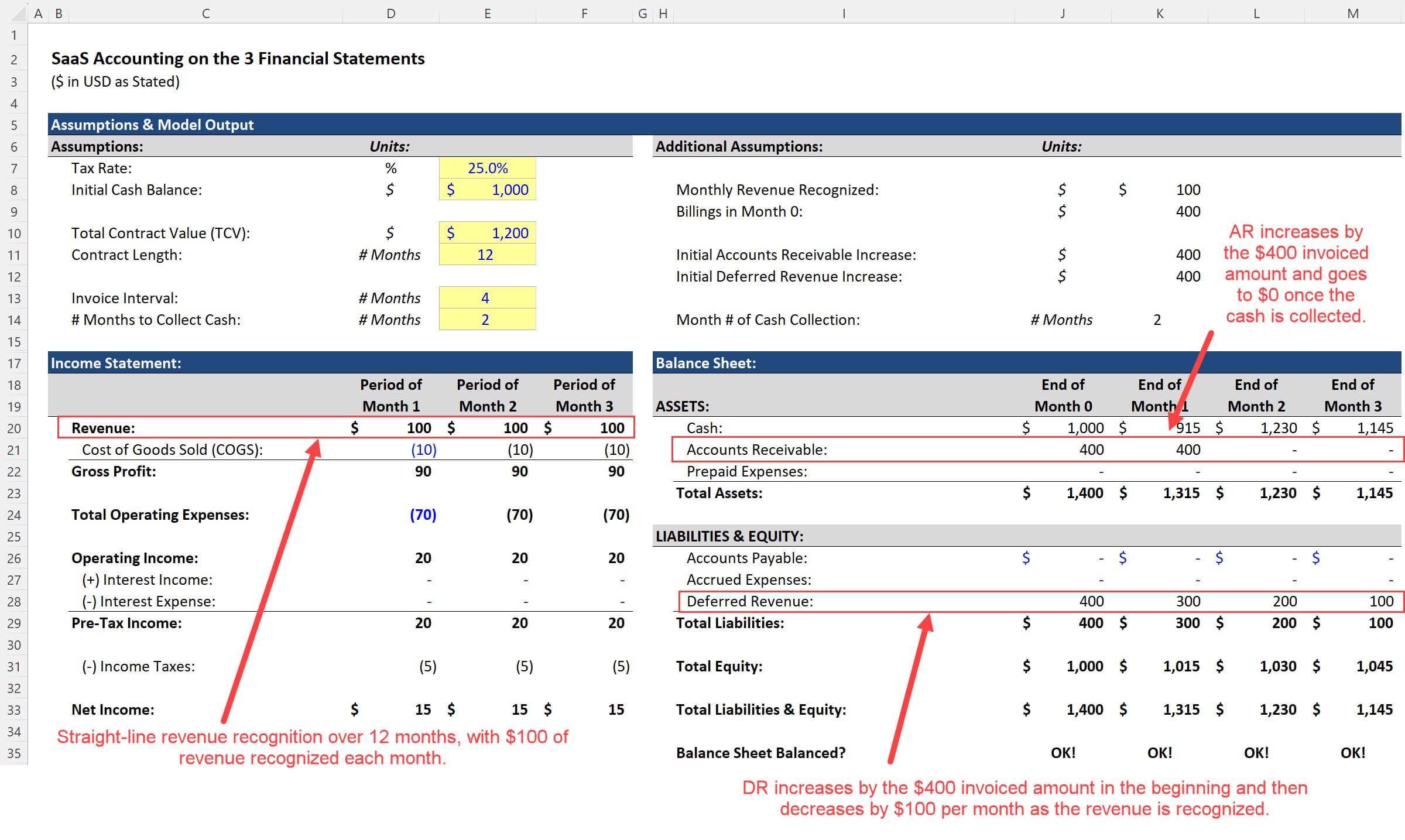
Source: breakingintowallstreet.com
What Is SaaS Accounting?
SaaS accounting is accounting software delivered over the internet. You log in from a browser. Your data is stored securely in the cloud. Updates, backups, and maintenance happen automatically.
Unlike on-premises systems, SaaS accounting scales with your business. You can add users, connect apps, and spin up entities without big IT projects. It supports real-time dashboards, automated workflows, and strong controls to help you stay compliant with standards like GAAP, ASC 606, and IFRS 15.
From my experience, the biggest win is visibility. You see cash, revenue, and expenses as they move. That means faster answers to key questions, better forecasts, and fewer fire drills at month-end.
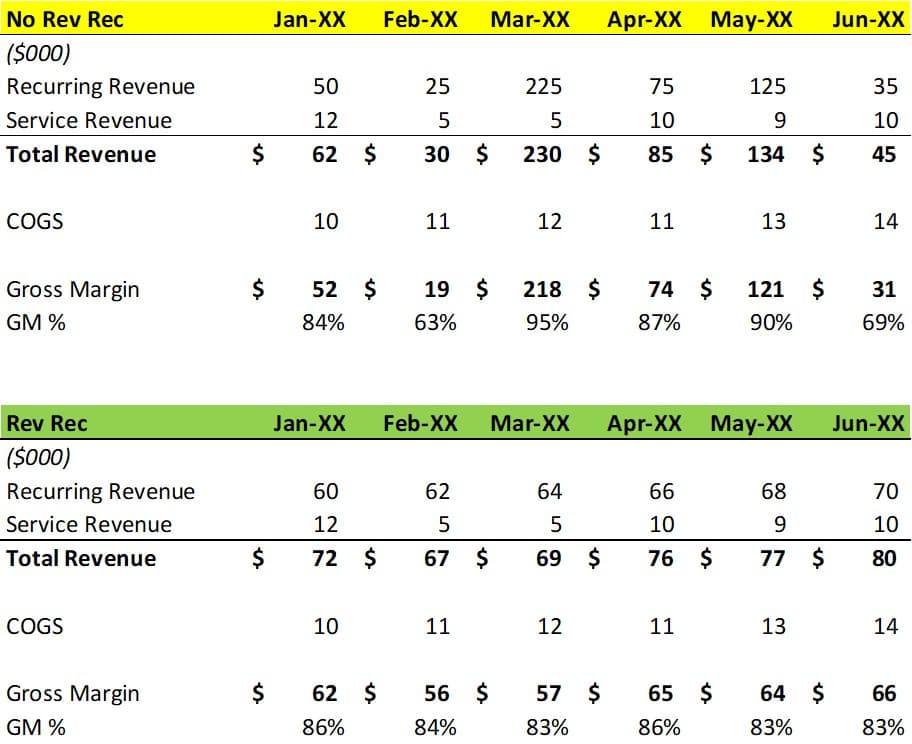
Source: www.thesaascfo.com
Key Features And Capabilities
Modern platforms bundle core accounting with automation and analytics you can trust.
- General ledger and subledgers One source of truth with audit trails and role-based access.
- Accounts payable and receivable Automated approvals, 3-way match, vendor and customer management.
- Revenue recognition ASC 606 and IFRS 15 support, including performance obligations and deferred revenue.
- Subscription billing Usage, tiered, and hybrid models with proration and dunning.
- Multi-entity and multi-currency Consolidation, eliminations, and local tax handling.
- Integrations APIs to connect CRM, payroll, banks, data warehouses, and BI tools.
- Controls and compliance Segregation of duties, SOC 1/SOC 2-ready features, and tamper-evident logs.
- Reporting and dashboards Real-time KPIs, drilldowns, and scheduled reports.
Tip from the field: turn on alerts for aging AR, negative MRR changes, and unusual spend spikes. Small signals caught early save cash and stress.

Source: www.netsuite.com
How SaaS Accounting Differs From Traditional Systems
- Deployment Cloud-based, no servers to manage, fast setup.
- Cost model Subscription pricing replaces large upfront licenses.
- Updates Continuous releases with new features and security patches.
- Scalability Add users or entities on demand.
- Access Work from anywhere with proper controls and SSO.
- Data and backups Built-in redundancy and disaster recovery.
I’ve seen teams cut their month-end close from 10 days to 4 when they move off legacy tools. Less time copying data. More time analyzing it.
Core Processes In SaaS Finance
- Quote-to-cash Link CRM, billing, and revenue recognition so deals flow into the ledger without re-keying.
- Billing and collections Automate invoices, payment retries, and dunning sequences to reduce DSO.
- Revenue recognition Apply rules to handle bundling, discounts, upgrades, and term changes.
- Spend management Control budgets, approvals, and virtual cards to curb rogue spend.
- Close and consolidation Use checklists, task owners, and reconciliations to speed the close.
- FP&A and forecasting Build driver-based models on top of live actuals for faster plans.
Practical example: A usage-based SaaS client moved metering data into billing nightly. Revenue recognition ran rules each morning. Daily updates made board meetings calmer and cleaner.
Benefits And ROI For Startups And Enterprises
- Faster close 30–60% faster in many rollouts thanks to automation and checklists.
- Cleaner compliance Built-in controls reduce audit adjustments and support SOC and ISO reviews.
- Better cash conversion Smarter collections and dunning can lift on-time payments by 10–20%.
- Executive visibility Live ARR, gross margin, and runway on dashboards cut surprise risks.
- Lower total cost Fewer manual hours, fewer custom IT projects, predictable pricing.
Evidence-backed note Many industry surveys report time savings, fewer errors, and higher data confidence after cloud adoption. Results vary by team size, data quality, and process maturity.
Common Challenges And How To Solve Them
- Data migration Old charts of accounts and messy history cause delays. Clean vendors, customers, and items before import. Map accounts line by line.
- Change management People resist new workflows. Run role-based training and appoint champions in finance and RevOps.
- Integrations APIs are powerful, but field mappings matter. Start with the minimal viable sync. Expand once stable.
- Revenue rules The edge cases bite. Document scenarios for upgrades, downgrades, refunds, and credits. Test them with real contracts.
- Reporting overload Too many dashboards confuse. Pick five core KPIs and add more later.
Lessons learned I once rushed a go-live without a clear UAT plan. We missed a tax rule and had to reissue invoices. Since then, I always run a two-week parallel close and a tax review before launch.
How To Choose The Right SaaS Accounting Platform
- Fit to your model Do you need subscription billing, usage, or project accounting?
- Compliance needs GAAP, ASC 606, IFRS 15, audit trails, and data residency.
- Integration depth Native connectors and open APIs to CRM, payroll, and BI.
- Multi-entity strength Intercompany eliminations, local tax, and consolidation speed.
- Security SSO, MFA, role-based access, and SOC 2 reports.
- Usability Clear workflows, mobile access, and strong search.
- Vendor health Roadmap transparency, support SLAs, and customer community.
Practical tip Run a conference-room pilot. Load 30 days of real data, process a mini close, and confirm KPIs match your current system.
Step-By-Step Implementation Roadmap
- Define scope Set goals, KPIs, entities, and must-have integrations.
- Clean and map data Standardize your chart of accounts, items, and contacts.
- Configure core modules GL, AP, AR, billing, and revenue rules.
- Integrate key systems Start with CRM, bank feeds, and payroll. Add more later.
- Test and train Run UAT, a parallel close, and role-based training sessions.
- Go live with guardrails Turn on monitoring, approvals, and escalation paths.
- Optimize and expand Add budgets, advanced analytics, and more automations after stability.
From experience, weekly steering meetings keep momentum. Small, steady wins beat a big-bang flip.
Real-World Examples And Use Cases
- High-growth subscription SaaS Multi-currency, usage-based billing, and fast ARR reporting.
- Multi-entity tech holding Intercompany transactions and monthly consolidation in hours.
- Professional services Hybrid revenue models with project accounting and time tracking.
- Nonprofit or education Fund tracking, grant reporting, and donor management integrations.
- E-commerce add-on SaaS SKU-level cost tracking and revenue bundles across channels.
Personal story A startup client struggled with churn visibility. We tied Stripe, CRM, and the ledger into a single dashboard. The CFO spotted churn spikes by segment and fixed onboarding gaps. Net revenue retention rose within a quarter.
Essential Metrics And Reports To Track
- MRR and ARR Baseline growth and seasonality.
- Net revenue retention Tracks expansions, contractions, and churn.
- Gross margin By product and region to guide pricing and cost control.
- CAC and LTV Align go-to-market spend with payback targets.
- Cash runway Blend burn rate with forecasted collections.
- Deferred revenue roll-forward Reconciles billing to revenue recognition.
- Aging AR and DSO Tighten collections and credit terms.
- Cohort analyses Reveal retention patterns by signup month or plan.
Automate delivery of these reports to leadership each Monday morning. Short feedback loops drive better decisions.
Frequently Asked Questions Of What Is SaaS Accounting
Q. What does SaaS accounting mean in simple terms?
It is cloud-based accounting software you access in a browser. It automates bookkeeping, billing, revenue recognition, and reporting with real-time data.
Q. Is SaaS accounting only for software companies?
No. Any business can use it. Still, it is especially helpful for firms with subscriptions, multi-entity needs, or fast growth.
Q. How does SaaS accounting handle ASC 606?
It applies rules to contracts and performance obligations. It schedules revenue over time or at a point in time and maintains deferred revenue and audit trails.
Q. Is my financial data secure in the cloud?
Vendors use encryption, role-based access, SSO, MFA, and audits like SOC 2. You must still set strong roles, reviews, and monitoring on your side.
Q. What systems should I integrate first?
Start with CRM for quote-to-cash, bank feeds for reconciliations, and payroll for labor costs. Add billing, data warehouse, and BI next.
Q. How long does implementation take?
Small teams can go live in 6–10 weeks. Complex, multi-entity setups may take 3–6 months, especially with deep integrations.
Will SaaS accounting reduce my month-end close time?
Yes, in most cases. Automation, reconciliations, and workflows can cut close time by 30–60% once processes stabilize.
Conclusion
SaaS accounting gives you speed, control, and clarity. It connects billing, revenue, spend, and reporting so you see the full story in real time. Start with the basics, prove value with a pilot, and expand with care. If you focus on data quality, revenue rules, and change management, you will feel the impact in your first quarter.
Take the next step. Map your top five KPIs, book a demo, and run a parallel close test. If you want more tips or tool picks, subscribe and drop your questions in the comments.
[Insert YouTube Video Here]